Part 1 — Using Edge ML in iOS/Android: Building a Smart Savings App with Transaction Text Classification
Introduction
This tutorial demonstrates how to build a text classification system for bank transactions using TensorFlow and deploy it on mobile platforms. The system automatically categorizes transaction descriptions and implements a micro-savings mechanism based on spending behavior analysis. This tutorial focuses on the Switzerland market — Swiss Francs (CHF) is the currency used.
The complete implementation covers synthetic data generation, model training in Google Colab, TensorFlow Lite conversion, and mobile integration for both iOS and Android platforms.
GitHub link for the tutorial resources
Use Case: Automated Transaction Classification and Micro-Savings
Problem Statement
Traditional budgeting applications require manual transaction categorization, leading to poor user adoption and inconsistent data quality. Our solution automates this process using machine learning to classify transactions and implement behavioral-based savings.
Classification System
The model classifies bank transactions into three categories with corresponding savings rates:
| Category | Description | Savings Rate | Examples |
|---|---|---|---|
| Normal | Essential expenses and regular income | 1% | Groceries, utilities, salary, rent |
| Avoidable | Non-essential but reasonable expenses | 2% | Dining out, subscriptions, entertainment |
| Regrettable | Impulse purchases and unnecessary expenses | 5% | Luxury items, duplicate purchases, late-night shopping |
The following diagram illustrates the transaction processing workflow:

Figure 1: Transaction classification and savings mechanism workflow
Savings Mechanism Workflow
- Transaction Input: Bank transaction description received
- Text Classification: TensorFlow Lite model processes the description
- Percentage Deduction: Apply savings rate based on classification (1% / 2% / 5%)
- Fund Accumulation: Deducted amounts accumulate in a savings account
- Automatic Investment: When the fund reaches a 50 CHF threshold, trigger an investment
Why Local Models
This implementation uses on-device inference through TensorFlow Lite rather than cloud-based APIs, for several critical reasons:
Cost Optimization — Eliminates per-request API costs by offloading inference to user devices, reduces server infrastructure, and scales without proportional cost increases.
Privacy Compliance — Sensitive financial data stays on the user’s device; complies with GDPR, PCI DSS and regional financial privacy regulations; no server-side storage of transaction descriptions.
Offline Availability — Classification works without connectivity, which is critical for real-time transaction processing. Model dependency and version management can be handled via tools like Firebase.
Performance — Sub-100ms inference latency on modern devices, no network round-trips, consistent response times independent of server load.
Synthetic Data Generation
Since real banking transaction data is sensitive and restricted, we generate synthetic transaction descriptions that mirror real-world patterns while maintaining privacy compliance.
import random
import pandas as pd

# 20 merchants per category
MERCHANT_CATEGORIES = {
    "normal": [
        "Migros Supermarket", "Coop Groceries", "Pharmacy Zürich", "SBB Ticket", "PostFinance Bill Pay",
        "Denner", "Lidl", "Aldi", "Swisscom", "Manor", "Tchibo", "Helsana Health", "City Bus Ticket",
        "Swiss Post", "Bookstore", "Local Bakery", "Apotheke Zürich", "Mobile Top-Up", "Cablecom", "Sunrise Telecom"
    ],
    "avoidable": [
        "Amazon Online", "Starbucks", "H&M Clothing", "Zara Outlet", "Gas Station", "C&A", "MediaMarkt", "Burger King",
        "Mobile Accessories", "Spotify", "Netflix", "IKEA", "Decathlon", "Uber Eats", "Globus", "AliExpress",
        "Online Gaming", "Domino's Pizza", "Electronics Mall", "Snack Vending Machine"
    ],
    "regrettable": [
        "McDonald's", "Cigarette Shop", "Bar Zürich", "Late Night Kebab", "Liquor Store", "24/7 Shop",
        "Fast Food Van", "Sports Betting", "Hookah Lounge", "After Party Club", "Beer Shop", "Fried Chicken Stand",
        "Mini Bar", "Nightlife Lounge", "Vodka & More", "Late Night Donuts", "Whiskey World", "Shisha Zone",
        "Pub Crawl ZH", "Late Night Snacks"
    ]
}

def generate_transaction():
    category = random.choice(list(MERCHANT_CATEGORIES.keys()))
    merchant = random.choice(MERCHANT_CATEGORIES[category])

    if category == "normal":
        amount = round(random.uniform(5, 80), 2)
    elif category == "avoidable":
        amount = round(random.uniform(10, 100), 2)
    else:  # regrettable
        amount = round(random.uniform(5, 50), 2)

    transaction_text = f"{merchant} - CHF {amount}"

    return {
        "merchant_name": merchant,
        "transaction_amount": amount,
        "transaction_text": transaction_text,
        "transaction_type": category
    }

def generate_dataset(num_samples=5000, output_csv="synthetic_transactions.csv"):
    data = [generate_transaction() for _ in range(num_samples)]
    df = pd.DataFrame(data)
    df.to_csv(output_csv, index=False)
    print(f"Generated {num_samples} synthetic transactions to: {output_csv}")

if __name__ == "__main__":
    generate_dataset(num_samples=5000)
A small data-improvement script normalizes the text to lowercase for consistent training:
import pandas as pd

df = pd.read_csv("synthetic_transactions.csv")
df['transaction_text'] = df['transaction_text'].str.lower()
df.to_csv("synthetic_transactions_processed.csv", index=False)
print("Data preprocessing completed")
TensorFlow Model Training in Google Colab
Note: when I tried the TensorFlow documentation, some code was outdated. I had to search, read through docs and use AI assistants to figure out missing pieces. If the code below is outdated by the time you try it, feel free to repeat what I did — the world moves fast! 😅
Data loading and preprocessing
import pandas as pd
import numpy as np
import tensorflow as tf
from sklearn.model_selection import train_test_split
from tensorflow.keras.layers import TextVectorization

df = pd.read_csv("synthetic_transactions.csv")

label_to_index = {'normal': 0, 'avoidable': 1, 'regrettable': 2}
index_to_label = {v: k for k, v in label_to_index.items()}
df['label'] = df['transaction_type'].map(label_to_index)

X_train_raw, X_val_raw, y_train, y_val = train_test_split(
    df['transaction_text'].values,
    df['label'].values,
    test_size=0.2,
    random_state=42
)
Text vectorization and model architecture
max_tokens = 1000        # Vocabulary size limit
sequence_length = 20     # Maximum input sequence length

vectorizer = TextVectorization(
    max_tokens=max_tokens,
    output_mode='int',
    output_sequence_length=sequence_length
)
vectorizer.adapt(X_train_raw)
X_train = vectorizer(X_train_raw)
X_val = vectorizer(X_val_raw)

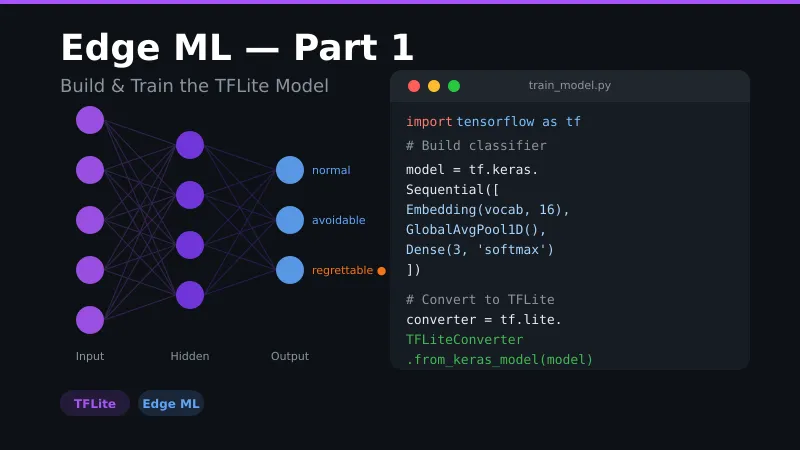
model = tf.keras.Sequential([
    tf.keras.layers.Embedding(input_dim=max_tokens, output_dim=16, input_length=sequence_length),
    tf.keras.layers.GlobalAveragePooling1D(),
    tf.keras.layers.Dense(32, activation='relu'),
    tf.keras.layers.Dense(3, activation='softmax')  # 3 output classes
])

model.compile(optimizer='adam', loss='sparse_categorical_crossentropy', metrics=['accuracy'])
Training and TensorFlow Lite conversion
history = model.fit(X_train, y_train, validation_data=(X_val, y_val), epochs=10, batch_size=32)
model.export("transaction_classifier_savedmodel")

converter = tf.lite.TFLiteConverter.from_saved_model("transaction_classifier_savedmodel")
tflite_model = converter.convert()

with open("transaction_classifier.tflite", "wb") as f:
    f.write(tflite_model)
The resulting model: ~68 KB, input shape (1, 20) integers, output shape (1, 3) probabilities, 1000-token vocabulary, <50ms inference on mobile. Training takes under 2 minutes on Colab and reaches ~100% accuracy on the synthetic data (real-world data will be messier).
Vocabulary export
We need the vectorizer’s vocabulary to reproduce the same tokenization inside the iOS and Android TensorFlow Lite interpreters:
import json
from google.colab import files

vocabulary = vectorizer.get_vocabulary()
vocab_dict = {word: idx for idx, word in enumerate(vocabulary)}

with open("vocabulary.json", "w") as f:
    json.dump(vocab_dict, f)

files.download("vocabulary.json")
files.download("transaction_classifier.tflite")
Alternative: CreateML Training
TL;DR: great for iOS/macOS, not recommended for Android.
For iOS-focused development, Apple’s CreateML trains a text classifier without code: open CreateML, pick the Text Classification template, upload the CSV (it auto-detects transaction_text and transaction_type), train for 1–2 minutes, test in the Preview panel, and export a .mlmodel.
| Aspect | CreateML | TensorFlow |
|---|---|---|
| Platform support | iOS/macOS only | Cross-platform |
| Training | GUI-based, no coding | Code-based |
| Model format | CoreML (.mlmodel) | TensorFlow Lite (.tflite) |
| Model size | ~45 KB | ~68 KB |
| Integration | Native iOS/macOS | Requires TFLite runtime |
I would not recommend converting CreateML models for Android: CreateML optimizations don’t translate well to ONNX or TFLite — you may lose quantization, custom layers or platform-specific acceleration. It may work for simple text classification, but expect differences in complex tabular models.
In Part 2 we integrate the TFLite model into a native iOS app with Swift, and in Part 3 into Android with Kotlin.