Android SSL Validation / Trust Anchor Exception Fix
Fixing “Failed to validate the certificate chain, error: java.security.cert.CertPathValidatorException: Trust anchor for certification path not found”
There are many reasons why you would get the above error. It could be:
- An improperly configured certificate chain on the server
- A self-signed certificate
- A certificate authority that is new or unknown
More details are discussed in the Android security-with-HTTPS documentation.
It will be tempting to write a trust manager that trusts all certificates. But beware — you will be rejected in Play Store review. The following approach gives you a safe way to trust your CA (Certificate Authority).
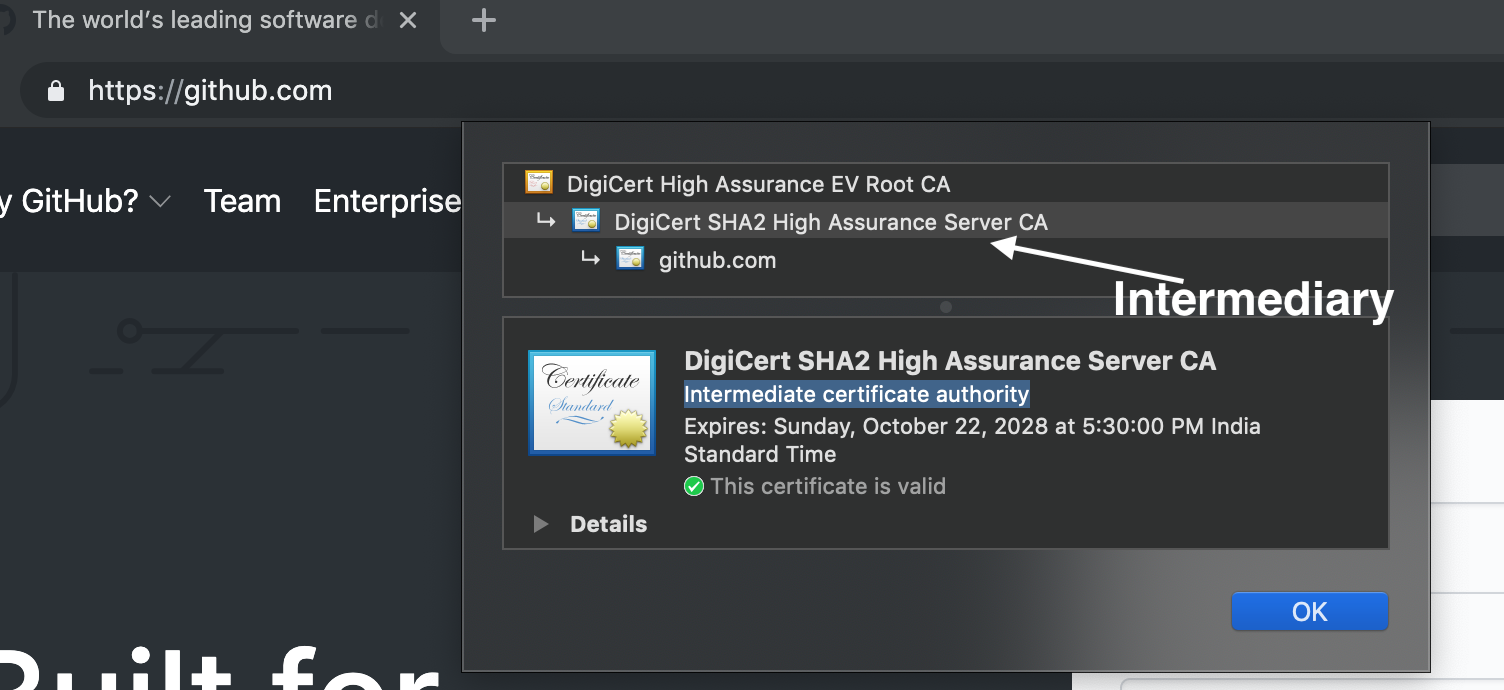
Place your certificate in the app/src/main/res/raw folder (the raw folder may not exist, so create one). If you’re unsure which certificate to use, open your URL in Chrome and take the intermediate one — usually called the intermediate certificate authority (one above your domain).
Create a new XML file called network_security_config.xml in app/src/main/res/xml and paste the following content:
<network-security-config>
    <base-config>
        <trust-anchors>
            <!-- Trust preinstalled CAs -->
            <certificates src="system" />
            <!-- Place your trust certificates here -->
            <certificates src="@raw/my_ca" />
        </trust-anchors>
    </base-config>
</network-security-config>
That’s it. Invalidate your Android Studio cache and try again. It should work!