The 403 That Isn't: iOS Swallows Forbidden Responses Behind mTLS
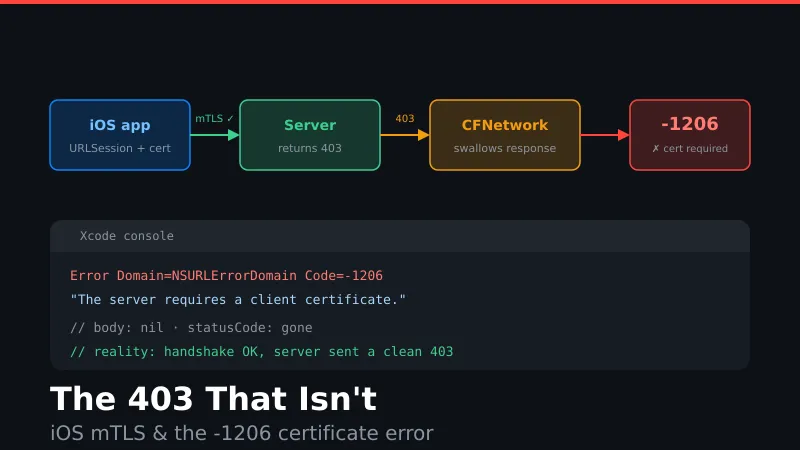
tl;dr — If your iOS/iPadOS app uses mutual TLS and your backend returns HTTP 403, CFNetwork discards the response and hands you NSURLErrorClientCertificateRequired (-1206) instead. Your certificate is fine. It’s a deliberate heuristic that assumes you might have picked the wrong cert. Return a different status code from the server. Reported in 2015, still true today.
The symptom
The error looks like this:
Error Domain=NSURLErrorDomain Code=-1206
"The server "api.example.com" requires a client certificate."
Response body nil, status code gone. As far as your networking layer knows, the handshake failed.
It didn’t. The server authenticated your client, ran the request, and answered it — check your logs and you’ll see a clean 403 going out.
How to tell it’s this
Every other status code works. 200, 401, 404, 500 — all fine. Only 403 turns into a certificate error. If your cert were actually broken, nothing would work.
Second tell: the socket stays open through the exchange and the error appears after the response arrives. A real client-cert rejection fails during the handshake, before your request is ever sent.
If you’re seeing -1206 on exactly one endpoint and it’s the one returning 403, stop debugging your PKI.
Why it happens
Apple’s DTS has described the logic. CFNetwork applies roughly this rule:
- Response was 403, and
- Your delegate responded to a client identity authentication challenge, and
- The app has multiple digital identities in the keychain — actually checked on macOS, but assumed true on iOS
→ Fail with NSURLErrorClientCertificateRequired. Otherwise deliver the 403.
That third condition is the whole problem. The heuristic means well: “Forbidden right after presenting a cert — maybe you picked the wrong one, try another.” On macOS the check is real. On iOS it’s hardcoded true, so every mTLS 403 becomes a certificate failure.
It conflates two independent layers. An authenticated client being told it may not access a resource is exactly what 403 means. iOS treats that as impossible.
The fix
Stop returning 403 to iOS clients on mTLS endpoints.
- 401 — confirmed to make it vanish. Closest sibling, though it implies “authenticate” rather than “authenticated but not permitted.”
- 409 / 422 / 400 — better if the denial is about request state rather than identity.
- 404 — plenty of APIs already hide unauthorized resources this way.
Whichever you pick, put the real reason in the body with a machine-readable error code and branch on that instead of the status. You should be doing this anyway.
Can’t touch the app? Remap at the edge — nginx, Envoy, an ALB rule, an F5 iRule. This is the escape hatch when the 403s come from a framework or OAuth layer you don’t control, which is common. Scope it narrowly and document loudly why an inexplicable 409 exists in your API.
Client-side workarounds (avoid)
Apple suggests populating certificate_authorities in the TLS CertificateRequest, surfaced via NSURLProtectionSpace.distinguishedNames, so the client picks the right identity. That solves genuine multi-cert ambiguity. It does nothing if you only ever had one cert and just want your 403 back.
DTS has also floated re-issuing the request through CFHTTPStream to read the real response. It works, and it means running a second, proxy-unaware networking stack to recover a status code you already have.
One gotcha: at least one developer reports the substitution only happens in the first five to ten minutes of a URLSession’s life, consistent with TLS session caching. If so, it reproduces on cold launch and then quietly stops — budget for “works on my machine.”
Status
rdar://41009229, filed 2018, re-reporting behavior documented in 2015. Not marked fixed as of the last public DTS comment. Testing this week says unchanged.
Ten years. Assume it’s permanent, fix your backend, move on.
Originally documented in this Stack Overflow question, October 2015. Mechanism details from Apple Developer Forums threads 70641, 89462, and 682609.